Email Click-To-Open Rate(CTRO) Calculator
From open to click, watch your emails thrive! Track conversions with this CTRO calculator!
What is Email Click-To-Open Rate(CTRO)?
Transform Opens Into Action and Unleash Explosive Email Results with the CTOR Calculator
Tired of watching your emails get opened but ignored? Ready to ignite engagement, drive clicks, and transform your email campaigns into conversion powerhouses? Introducing the Email Click-To-Open Rate (CTOR) Calculator, your secret weapon to measure true email engagement, optimize content, and create experiences that captivate audiences and drive results that matter.
Here's why it's your indispensable guide to email engagement mastery:- Understand True Engagement, Beyond Opens: See beyond open rates to measure the percentage of recipients who not only open your emails but also take the desired actions within them. Pinpoint what truly resonates with your audience and drives conversions.
- Optimize Content for Irresistible Clicks: Use CTOR insights to refine your email content, calls to action, and overall messaging to create experiences that capture attention, spark interest, and compel recipients to click. Drive traffic to your website, landing pages, and offers with precision.
- Experiment Like a Conversion Scientist: Test different subject lines, email designs, layouts, and content formats to discover what drives the highest CTOR. Continuously improve your email strategy and create content that resonates with your audience.
- Personalize for Deeper Engagement: Use CTOR data to segment your audience, send targeted emails based on interests and behaviors, and create personalized experiences that drive even higher engagement and conversion rates. Build stronger relationships with your subscribers.
- Align Emails with Business Goals: Track CTOR for specific campaigns and initiatives to measure their effectiveness in driving conversions and achieving your business objectives. Make data-driven decisions that align your email marketing with your broader business goals.
The CTOR Calculator is more than just a tool—it's your engagement advisor, your conversion strategist, and your key to unlocking the full potential of your email marketing efforts.
Remember
In the world of email marketing, engagement is the bridge between opens and conversions. And the CTOR Calculator empowers you to build that bridge with confidence and precision. Embrace the clarity, control, and strategic insights it provides. Start using the CTOR Calculator today and start igniting engagement that drives results that matter!
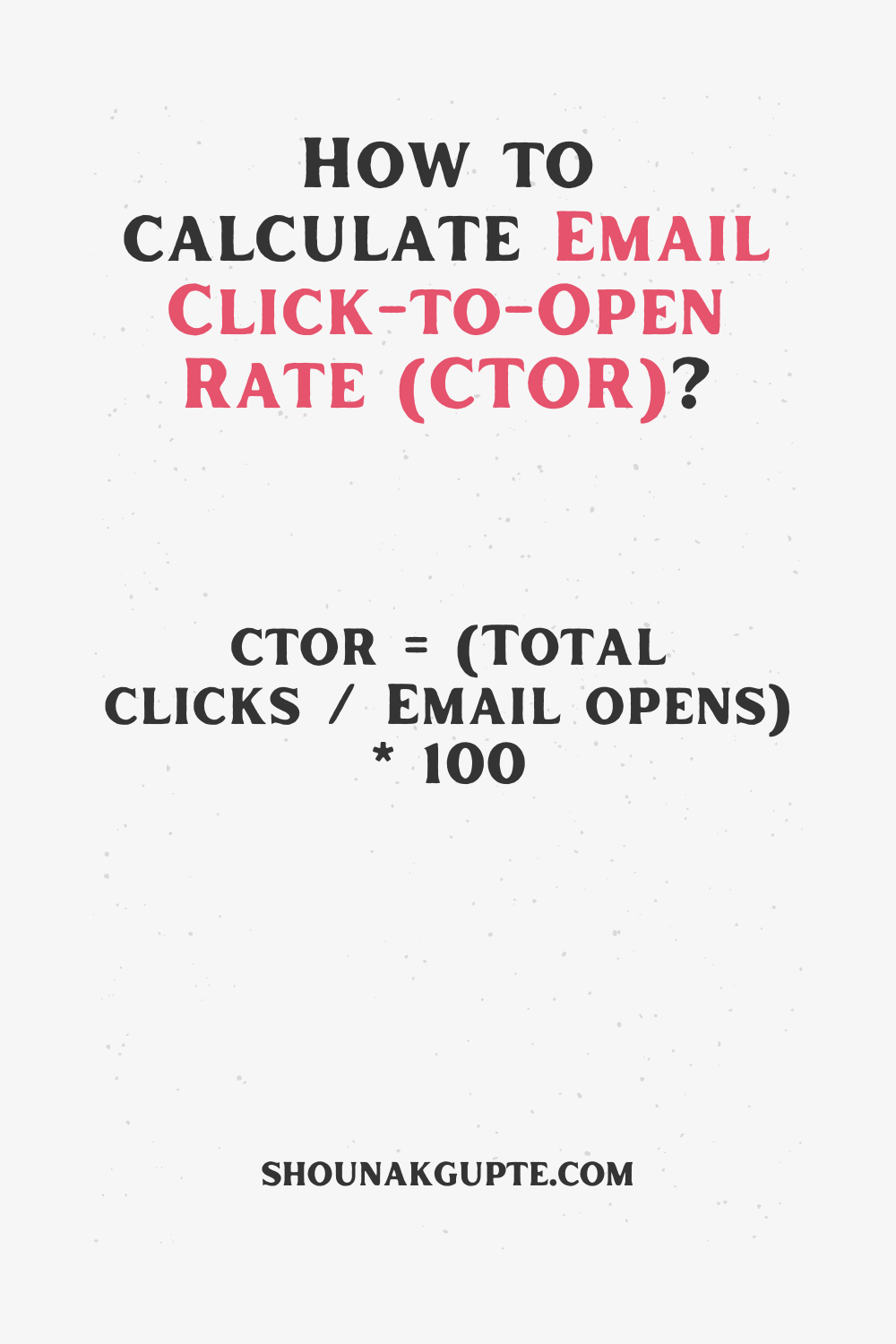
Email Click-To-Open Rate(CTRO) Formula - How To Calculate Email Click-To-Open Rate(CTRO)?
Help!
Number of Email Clicks: Count of times recipients clicked on links within emails. Valid inputs are non-negative numbers.Number of Emails Opened: Total emails that were opened by recipients. Valid inputs are positive numbers.
Click-to-Open Rate (CTOR): Percentage of opened emails that led to clicks, reflecting engagement with the email content. Expressed as a percentage between 0% and 100%.
Your Input
The Click-to-Open Rate (CTOR) of your email campaign is 0%.
Benchmarks!
There's no universal benchmark for Email Click-To-Open Rate (CTRO) due to significant variations across industries, email types, and audience engagement. However, here are some general ranges for context:Global average CTOR: 10.5%
Industry-specific benchmarks:
- Hobbies & Interests: 17.4%
- Family & Social Services: 17.1%
- Government: 15.9%
- Education: 13.4%
- Healthcare: 12.4%
- Media: 11.5%
- Finance: 9.4%
- Construction: 8.6%
- Email content relevance: Engaging, relevant content drives clicks.
- Call to action (CTA) clarity: Clear, compelling CTAs encourage action.
- Target audience interests: Alignment with audience needs increases clicks.
- Email design and layout: User-friendly design facilitates engagement.
- Research CTOR benchmarks specific to your industry and email type.
- Track your own CTOR over time and aim for improvement.
- Compare your CTOR to competitors within your industry.
- Focus on creating high-quality, relevant emails with strong CTAs.
- Design emails for readability and easy navigation.
- Segment your audience to send more targeted, personalized content.
Success
Related Calculators
Email Bounce Rate Calculator
Stop those vanishing emails! Diagnose bounce rates and boost inbox love with this calculator!
Click HereEmail Click-To-Open Rate(CTRO) Calculator
From open to click, watch your emails thrive! Track conversions with this CTRO calculator!
Click HereEmail Open Rate Calculator
Crack the inbox barrier! Track your email's 'open sesame' power with this rate calculator!
Click HereEmail Unsub Rate Calculator
Nip goodbye emails in the bud! Track unsubscribe rates and keep inboxes happy with this calculator!️
Click HereEmail Click-To-Open Rate(CTRO) Calculator FAQs
1. What is Email Click-To-Open Rate (CTRO)?
Email click-to-open rate (CTRO) is a metric that measures the percentage of email recipients who click on a link within an email. It is calculated by dividing the number of clicks by the number of emails delivered. For example, if you send an email to 100 people and 20 of them click on a link in the email, your CTRO would be 20%. A high CTRO indicates that your email campaign is successful in capturing the attention of your audience and encouraging them to take action.
2. How to Calculate Email Click-To-Open Rate (CTRO)?
To calculate your email CTRO, follow these steps:
- Count the number of clicks: This is the number of times that recipients clicked on a link in your email.
- Count the number of delivered emails: This is the number of emails that were successfully delivered to your recipients' inboxes.
- Divide the number of clicks by the number of delivered emails: This will give you your CTRO as a percentage.
3. What is a Good Email Click-To-Open Rate (CTRO)?
A good email CTRO varies depending on your industry and target audience. However, a general rule of thumb is that a CTRO of 20% or higher is considered to be good. Anything below 10% is considered to be poor.
4. How to Improve Email Click-To-Open Rate (CTRO)?
There are a number of things you can do to improve your email CTRO, including:
- Write a compelling subject line: Your subject line is the first thing that your recipients will see, so make sure it's attention-grabbing and relevant to your target audience.
- Personalize your emails: Use your recipients' names and other personal information to make your emails more relevant to them.
- Keep your emails short and to the point: People are busy, so they don't have time to read long emails. Get to the point quickly and avoid using jargon or technical terms.
- Use images and videos: Images and videos can help to break up the text and make your emails more visually appealing.
- Include a clear call to action: Tell your recipients what you want them to do after they read your email. This could be clicking on a link, signing up for a free trial, or making a purchase.
5. What are the Benefits of a High Email Click-To-Open Rate (CTRO)?
There are a number of benefits to having a high email CTRO, including:
- Increased traffic to your website: When people click on links in your emails, they are taken to your website. This can lead to increased traffic and conversions.
- Improved brand awareness: When people click on links in your emails, they are exposed to your brand. This can help to improve brand awareness and recall.
- Stronger customer relationships: When people click on links in your emails, it shows that they are interested in what you have to say. This can help to build stronger customer relationships.
6. What Does a Good Email Click-To-Open Rate (CTRO) Look Like?
A good email CTRO looks like:
- A high percentage of clicks: The higher the percentage of clicks, the better. A good CTRO is typically 20% or higher.
- A consistent trend of clicks: Your CTRO should be consistent over time. If you see a sudden drop in your CTRO, it could be a sign that something is wrong with your email campaign.
- A positive response from your audience: Your audience should be responding positively to your emails. This could mean clicking on links, signing up for free trials, or making purchases.
7. What are Some Common Email Click-To-Open Rate (CTRO) Problems?
Some common email CTRO problems include:
- A low percentage of clicks: If your CTRO is low, it means that people are not clicking on the links in your emails. This could be due to a number of factors, such as a weak subject line, irrelevant content, or a lack of a clear call to action.
- A sudden drop in clicks: If you see a sudden drop in your CTRO, it could be a sign that something is wrong with your email campaign. This could be due to a change in your email content, a problem with your email delivery, or a change in your target audience.
- A negative response from your audience: If your audience is responding negatively to your emails, it could be a sign that your emails are not relevant to them or that you are sending too many emails.
8. How to Troubleshoot Email Click-To-Open Rate (CTRO) Problems?
If you are having problems with your email CTRO, there are a number of things you can do to troubleshoot the problem:
- Check your subject line: Make sure your subject line is attention-grabbing and relevant to your target audience.
- Review your email content: Make sure your email content is relevant to your target audience and that it is written in a clear and concise style.
- Include a clear call to action: Tell your recipients what you want them to do after they read your email.
- Test your emails: Before you send your emails, test them to make sure that they are rendering correctly and that the links are working.
- Monitor your email metrics: Track your email metrics, such as your CTRO, open rate, and bounce rate. This will help you to identify any problems with your email campaign.
9. What are Some Email Click-To-Open Rate (CTRO) Best Practices?
Some email CTRO best practices include:
- Segment your email list: Segment your email list so that you can send targeted emails to your different audience segments.
- Personalize your emails: Use your recipients' names and other personal information to make your emails more relevant to them.
- Keep your emails short and to the point: People are busy, so they don't have time to read long emails. Get to the point quickly and avoid using jargon or technical terms.
- Use images and videos: Images and videos can help to break up the text and make your emails more visually appealing.
- Include a clear call to action: Tell your recipients what you want them to do after they read your email.
- Test your emails: Before you send your emails, test them to make sure that they are rendering correctly and that the links are working.
10. What are Some Email Click-To-Open Rate (CTRO) Trends?
Some email CTRO trends include:
- The increasing use of mobile devices: More and more people are using mobile devices to check their email. This means that it is important to make sure that your emails are mobile-friendly.
- The rise of interactive content: Interactive content, such as videos, quizzes, and polls, can help to improve your email CTRO. This is because interactive content is more engaging than static content.
- The growing importance of personalization: Personalization is becoming increasingly important in email marketing. This is because personalized emails are more relevant to recipients and are more likely to be opened and clicked.
